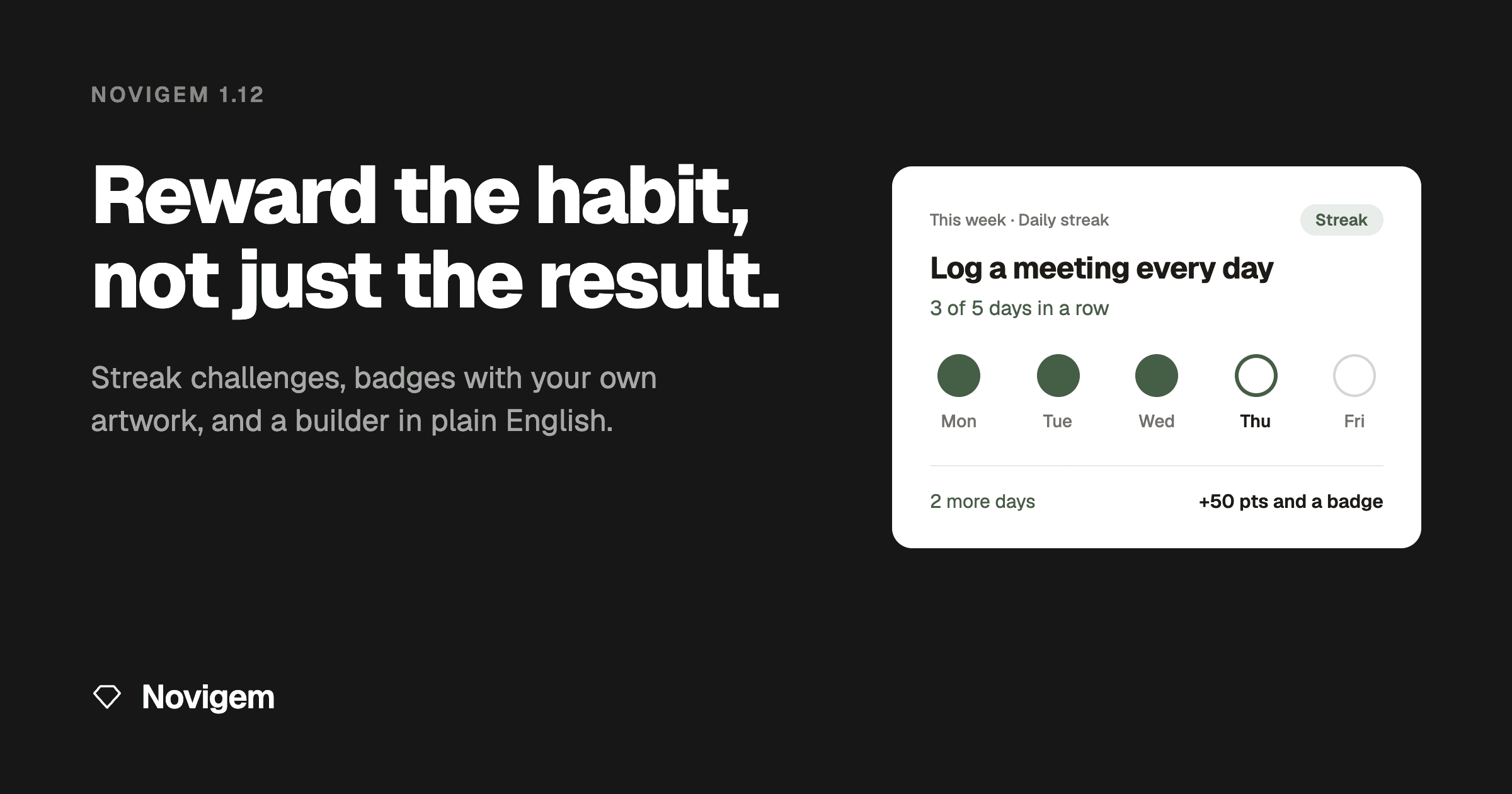
Novigem 1.12: Reward the Daily Habits That Build Results
Most sales challenges reward a number. Close three deals. Book twenty meetings. Hit the target by the end of the month.
That works for a sprint. It does much less for the things you want people to do every day, like logging a call while it is still fresh. A rep who logs nothing for three weeks and catches up on a Friday afternoon can still win.
Novigem 1.12 is built for those daily habits.
Streak challenges: reward the habit
A challenge can now be a streak. You choose what counts and how long the run has to be. For example:
- Log a meeting every day for five days.
- Submit your timesheet six weeks in a row.
Novigem keeps track of each person's run. Miss a day, or a week on a weekly streak, and the run starts over. Reach the goal and the challenge pays out like any other: the bonus points, the badge and the celebration.
The part reps notice is their challenge card. On shorter streaks it shows one marker per day or week. Filled for the days already done, outlined for today, empty for what is still ahead. Longer streaks show a progress bar instead. Either way, a rep can glance at the card and know exactly what they need to do today to keep it going.
"Two more days" is a much easier ask than "be more consistent".
For a manager, that changes the Monday meeting. Instead of asking the team to log better, you set up a five-day streak and let the card do the reminding.
A result at the end of the month tells you who won. A streak tells you who showed up every day. The habit is what you want to keep after the challenge ends, so it deserves a reward of its own.
Badges that look like your team
The standard badge icons do the job. But a badge means more when it looks like it belongs to your team.
In 1.12, admins can upload their own artwork for any badge, as a PNG or JPG. Use your team names, the art from this quarter's campaign, or the in-joke everyone on the floor will recognise. It is a setting, so an admin switches it on first.
The artwork shows up everywhere the badge does. In each person's badge collection, in the celebration when someone earns it, and in the Chatter post that tells the rest of the team.
A challenge builder that explains itself
Setting up a challenge used to assume you already knew the vocabulary. 1.12 rewrites the builder in everyday words.
Each choice now comes with a short explanation and an example, like "Example: log 20 calls" or "Example: close €50,000 in March". When something is not right, the warning tells you what to do next, not only what went wrong.
A sales manager can now build a challenge without learning the jargon first. That matters, because the person who knows which habit needs work is usually the manager, not the admin.
The smaller things
A handful of improvements sit alongside the headlines:
- See that your setup is connected. In settings, each object you track now shows whether Novigem can see something feeding it activity. An admin can spot an object that will never award points before the team notices.
- A more accurate Team Pulse. Finishing a challenge with no bonus or badge no longer makes a quiet rep look active. Last activity now reflects points they actually earned.
- No more negative progress. A challenge that adds up an amount, like deal value, stops at zero instead of going below it when refunds or discounts come in.
- Calmer celebrations on request. If someone's device is set to reduce motion, the celebration skips the confetti. Focus outlines are clearer and screen-reader labels are better in several places.
Getting 1.12
Novigem 1.12 ships as a standard managed package upgrade. The full release notes cover everything, including the two settings worth checking after you upgrade: the daily Novigem job, which is what notices a missed day and starts a streak over, and the switch for custom badge artwork. New here? The complete guide to Salesforce gamification is the best place to start, and the install guide takes about fifteen minutes.
You can also install straight from Novigem on the Salesforce AppExchange, where the package has passed Salesforce security review. Some orgs require software to arrive that way, and the listing is the quickest way to see what is in the package before installing anything.
Results tell you who won this month. Habits decide who wins next month. From 1.12 on, Novigem rewards both.